 English
 Español
 Català
Understand the foundation
- What Serenity is and why it exists
- How systems are organized and interact with each other
Menus, modals, themes, localization, audio, settings, events and a clean startup pipeline. Import it into your project and start building the game instead.

 Serenity
 Jump into the live demo and play with the menus, themes and UI systems for yourself. There's nothing to download and nothing to install.
Most modern game controllers work straight away in the browser. Plug one in before you start, or just use your keyboard and mouse.
It only loads when you click, so the first start can take a few seconds.
The demo works best on a desktop browser.
Open the demo in a new tabBecause scaling Unity projects shouldn’t feel like starting over every time.
Your Unity project starts simple… then becomes unmanageable.
A clean architecture that actually holds as your project grows.
Everything ends up tangled inside MonoBehaviours.
Build systems once, reuse them across all your projects.
You keep rebuilding the same systems again and again.
Clear boundaries between game logic, application, and Unity.
Your team loses consistency as the project grows.
A solid foundation your whole team can rely on.
More than thirty reusable Unity systems documented one by one: what they solve, how they fit together and when to use them.
Not the same systems, again.
No matter your role, Serenity has something for you.
A solid foundation to stay organized, move faster, and reuse systems across projects.
Create systems once and reuse them across projects instead of rebuilding from scratch.
Keeps your code organized and maintainable as your project grows.
Core systems independent from Unity; easier to test, reuse, and evolve.
The Serenity Hub is the package's start-here front door — a searchable workspace that puts every tool, wizard and validator one click away.
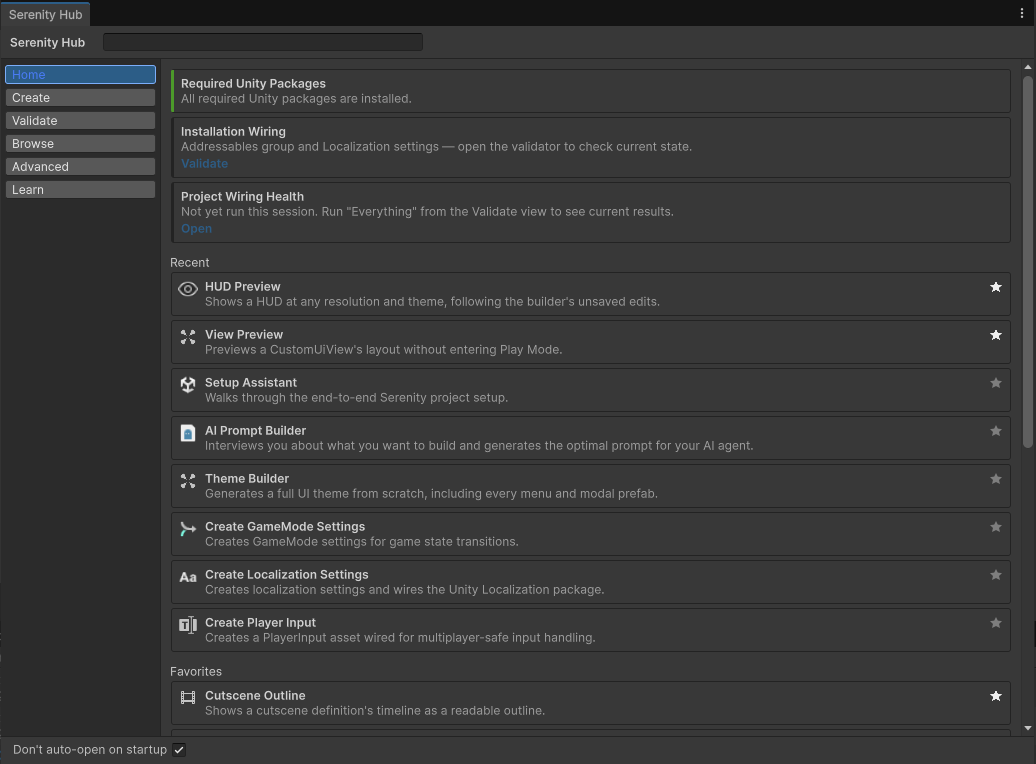
Every Tools ▸ Serenity entry lives in a single catalog, guarded by a staleness validator so the Hub can never silently drift out of date.
Every creation wizard runs on one shared step machine with a freely navigable breadcrumb, and rolls everything back atomically if it fails.
The Validate view shows every validator as a card with its cached result and timestamp — opening the Hub never triggers a project scan.
Pin the tools you use most; per-user, with no project assets touched.
Everything is one click — or one keystroke — away.
Configure in the editor. See it work instantly in-game.
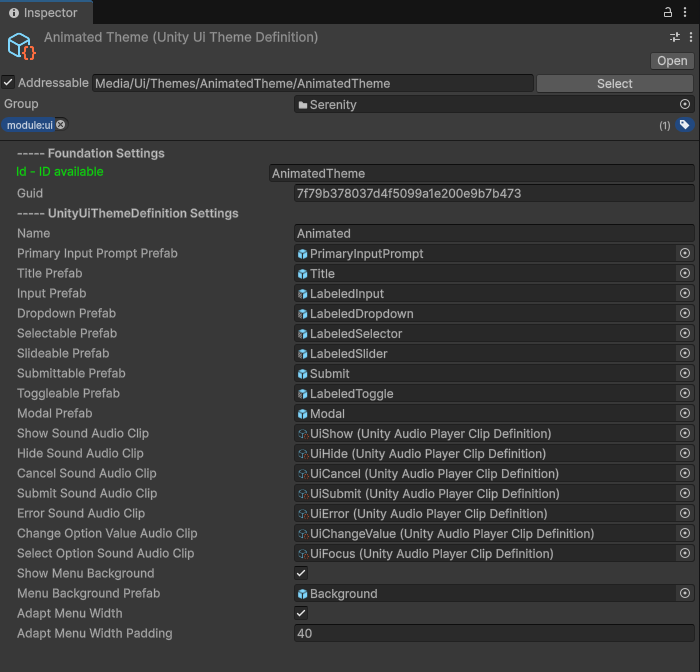
Set up systems in the editor without code.
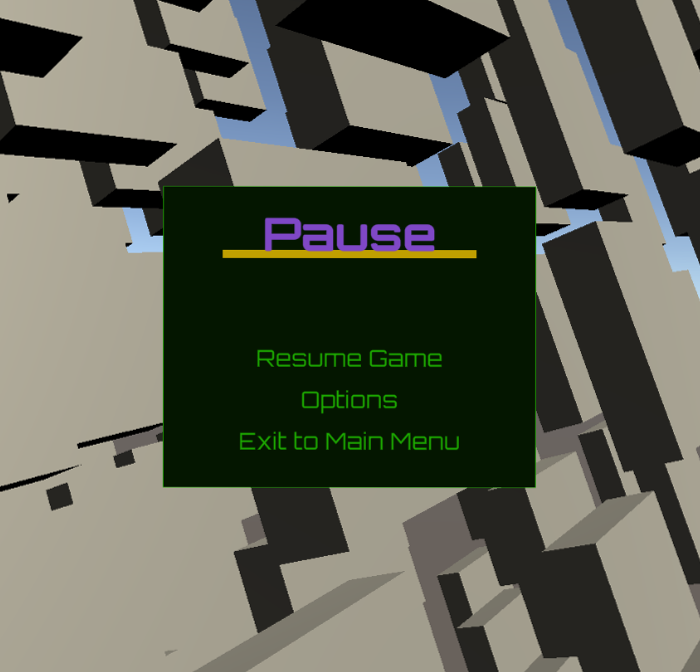
Systems working together in real time.
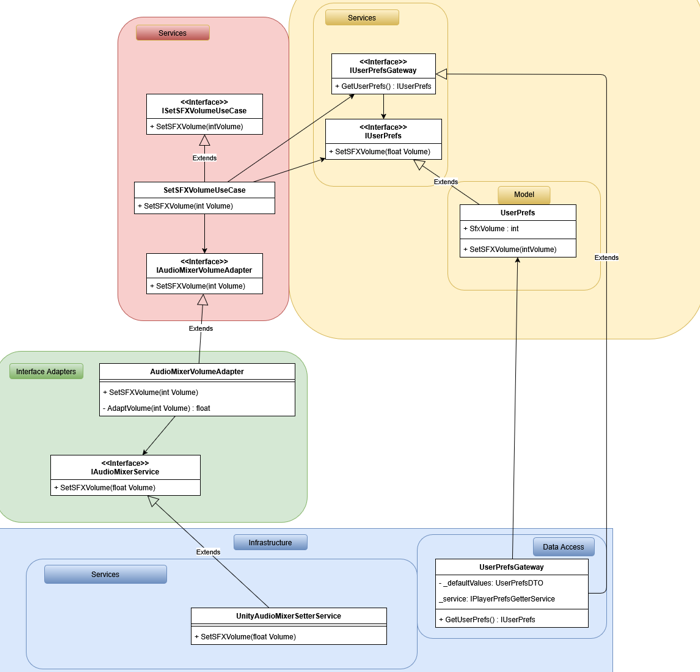
Understand how everything fits together.
No mockups. Real systems running in Unity.
Tangible results, not just theories.
Used in: Survival • Tower Defense • RTS
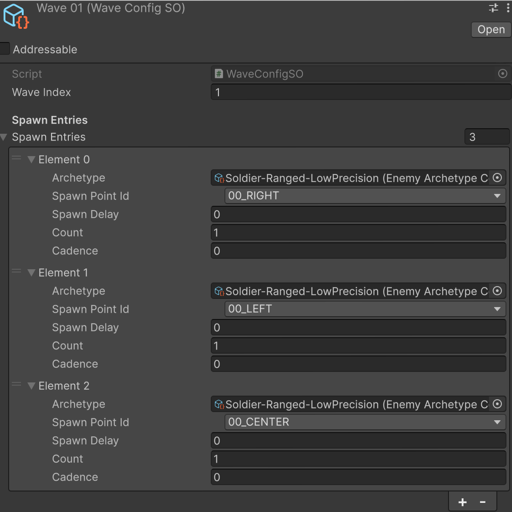 Define waves via ScriptableObjects
 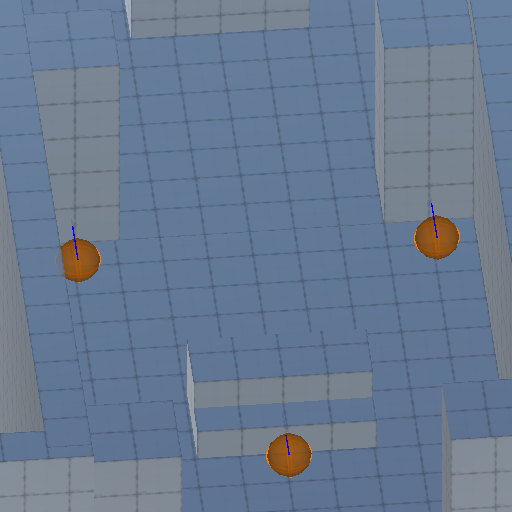 Set the spawn points on the scene
 Modular systems you can reuse across projects without rewriting core logic.
Foundational systems that drive your game architecture
A high-performance, type-safe event bus enabling loose coupling between systems. Supports event prioritization, filtering, and automatic listener cleanup. Ideal for observer or message-driven architectures across independent modules.
A modular initialization framework that defines startup sequences, resolves dependencies, and manages service lifecycles. Supports asynchronous setup, dependency injection, and robust error recovery for predictable boot flow.
Production-ready logging system with verbosity profiles and console, file, and custom output sinks. Filter noise per system while debugging and keep a persistent trail for issues that only happen on players' machines.
Named timers, scaled or unscaled, managed by one central service and ticked in one place. Query, pause, and reset them from any system, and get display-ready formatted text for your HUD without writing formatting code.
Abstracts Unity’s Input System to provide unified keyboard, mouse, gamepad, and touch input. Includes dynamic device detection, rebinding, and multiplayer input mapping. Expose configurations via ScriptableObjects for designers.
Data-driven systems to control behavior without code
Define, serialize, and validate game parameters through strongly-typed ScriptableObjects.
Environment-aware configuration system managing platform overrides, environment variables, and feature toggles. Supports runtime detection and layered profiles (development, staging, production).
Intelligent preloading system built around Addressables. Defines preload groups, tracks progress, and optimizes memory usage. Ensures assets are ready when needed for seamless scene transitions.
Runtime graphics configuration layer supporting resolution scaling, quality presets, and render pipeline detection (URP/HDRP/Built-in). Enables automatic hardware adaptation and persistent player preferences.
Platform-independent persistence built on store contracts with atomic writes, pluggable serialization, and optional encryption and compression. The same save code works across desktop and beyond.
Reusable UI patterns and systems
Build complete menu flows (pause, settings, navigation) using data-driven definitions. Supports nested hierarchies, transitions, dynamic content, and consistent theming without manual UI scripting.
Generate confirmation dialogs, alerts, and complex modals programmatically or from data. Supports modal stacking, backdrop control, input blocking, and async/await workflows for clean UX flow.
Handles view transitions, history tracking, and state restoration. Includes forward/back navigation, deep linking, and persistence across reloads. Ideal for layered or tabbed UI systems.
Modular UI component set with theme switching, defined via ScriptableObjects and applied globally or per view. The Theme Builder wizard generates a complete, ready-to-run theme — 20 prefabs plus animations — from three colors, no cloning required.
Wraps Unity Localization behind game and voice language settings that plug straight into your menus. Players switch language from an options menu you didn't have to code, and validators catch missing keys before your players do.
Anchored HUD elements bound to real game data through configured binding chains, with seven representations from ammo counters to gauges. Built visually in the HUD Builder, edited by direct manipulation in the HUD Preview, and validated in CI so a renamed member can't silently blank an element.
Audio and cinematic orchestration tools
Event-driven audio service supporting 2D/3D playback, crossfades, ducking, and priority-based management. Integrates with the Sound Mixer for dynamic mixing and efficient emitter pooling.
Plays and queries registered music tracks with seamless transitions, crossfades, loop regions, and start-point control. Bind tracks to game modes so the right music follows the player from menu to gameplay automatically.
Complete audio routing and mixing system with master, music, SFX, and voice buses. Supports volume persistence, effects chains, and runtime snapshots. Integrates with Unity’s AudioMixer or custom backend.
Plays ordered, timed stages — fades, waits, Unity Timeline — authored as simple assets, one-shot or looping. Comes with a step-by-step wizard, no-code triggers, and a live in-editor preview so you never enter Play mode just to check a cutscene.
The game-logic sibling of the Cutscene Player: run ordered sequences of timed steps for intros, phase changes, or scripted moments, keeping the flow declarative instead of buried in nested coroutines.
Higher-level systems built on top of the foundation; ready to use, extend, or replace.
Define how your game behaves across menus, gameplay, and pause without scattering logic across scenes. Keeps state transitions predictable and decoupled from Unity-specific code.
A typed state machine for your whole app: transitions are signals other systems subscribe to, pause behavior is a swappable strategy, and input maps, music, and scene loading stay coordinated without a hand-rolled GameStateManager.
One service that knows every camera in the scene (even inactive ones), switches the active camera without breaking Cinemachine rigs, and lays out local-multiplayer split-screen automatically as players join and leave.
Handle checkpoints as part of your game flow instead of wiring persistence manually. Supports multiple save points, scene transitions, and consistent state recovery out of the box.
GameSave keeps per-playthrough state in extensible, typed save slots; GameProgress keeps global unlocks and completion counts that survive slot deletion. Checkpoint quicksaves travel inside the active slot, and the same pluggable backends make cloud saves a configuration change.
Track and update score without spreading logic across systems. Supports multiple score sources and keeps scoring rules centralized and easy to modify.
A complete leaderboard stack: deterministic ranking with SQL RANK() tie semantics, pluggable storage from local files to SQLite, HTTP, or a real database, and a themeable view any menu can open with zero code. The five-step wizard configures it end to end.
A runtime consecutive-action counter that applies score multipliers. Feed it combo hits and breaks from your gameplay and let it handle the streak logic, so 'x4!' moments don't require their own subsystem.
Author character archetypes (grunt, heavy, boss) as validated config assets and let the runtime track every live instance's state. Balancing becomes editing an asset, not hunting through prefabs.
Define scripted spawn bursts — who, where, when, how many — as ordered wave sets that a stage advances through automatically. Designers tune encounters in the Inspector, with validation that flags empty spawn entries before they ship.
A stage is a prefab with a root and named spawn points that hosts your waves. Swap stages, reuse spawn layouts, and keep level structure consistent across the whole game.
Manage when, where, and how entities appear without hardcoding spawn behavior. Keeps spawning rules configurable and reusable across different game scenarios.
Move entities along rails without custom movement scripts. Ideal for guided gameplay, cameras, or on-rails mechanics while keeping logic decoupled and reusable.
Magazine, fire modes, trigger and reload handled as a runtime state machine you register and drive from code. Add weapons by configuring them, and keep firing logic out of your MonoBehaviours.
Bundle gamepad vibration, LED color, adaptive triggers, screen flash, hit-stop, screen shake, and audio into a single feedback definition, fired by id or by signal with zero code. DualSense, DualShock 4, and Switch Pro supported across platforms.
Rule-driven procedural motion — breathing, recoil, look-ats, flinches, one-shot activation sequences — blended additively over Unity's animation, with every layer declaring which of five channels it drives. Non-rig animators run the same pipeline on props and HUD elements. Bring characters and UI to life with configuration instead of extra animation clips.
Wizards, dashboards, and validators that hold your hand from first import to shipped game
One searchable workspace for all 89 Serenity tools — six views, Ctrl+K global search, favorites and recents — with your project's health at a glance and cached validation that only scans when you ask. Every issue deep-links to the tool that fixes it.
Scaffolds a working boot → main menu → gameplay → pause loop from an empty project, with live validation and a dry-run preview before anything is written. Your first hour with Serenity ends with a running game.
A step-by-step wizard that generates your theme asset, 20 ready-made prefabs, and show/hide and selection animations — registered into Addressables and ready to activate. No sample themes to clone, no manual wiring.
Aggregates health checks, missing references, localization gaps, Addressables labels, and audio registration into a single report. Fixable findings get Fix buttons that tell you exactly what will change before touching anything.
Deleting an asset that others still reference opens a review window listing every affected asset. Delete & Clean removes the asset and nulls out stale references automatically, logging everything it touched.
See cause → signal → effect as a node diagram with filters for unused signals, dispatchers, modals, and code reactions. Click any node to jump to the asset or script behind it.
The Cutscene Outline renders your cutscene — fades, waits, Timeline stages — through the rig's own camera inside the editor window. Iterate on timing without touching your open scene.
Model clips, standalone clips, animator controllers and procedural animation inventoried in one browse window — create and edit in place, preview clips live on the actual model, and simulate procedural profiles without touching your scene or assets.
Generates fully wired extension code for services, stores, repositories, gateways, factories, installers and even your own classes — no hand-written boilerplate to layer your logic on top of the framework.
A stepped wizard that interviews you about what you want to build, scans the project so the prompt extends your real assets instead of creating from scratch, and delivers the result to the clipboard, a file or an installed slash command — with a personal library of reusable instructions.
Menus, modals, audio, cutscenes, and settings described as recipe files that import idempotently into real assets — with validation, dry runs, and machine-readable reports, so designers and AI agents can build content safely.
Serenity is designed to be understood in context; not through isolated code snippets, but as a complete system working together.
This video series walks you through a fully configured project where all core systems are already in place. You won’t start from scratch; you’ll explore, understand, and then build on top of something real.
Each video focuses on a specific concept, showing how everything connects without unnecessary complexity or boilerplate.
Start from the first video or explore freely.
This series is structured to help you progressively understand how Serenity works; from the big picture down to practical usage.
By the end of this series, you won’t just know how to use Serenity; you’ll understand how to think with it.
Take your time exploring the videos; everything is already set up for you to follow along.
Install the package, run the installer, and the nine core systems are already wired up. The documentation walks you through the rest.